

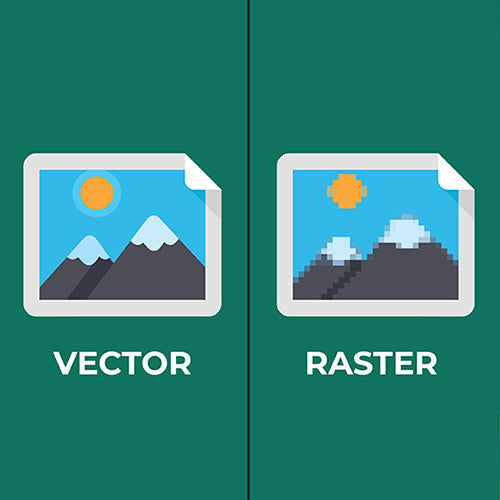
A logo can look perfectly sharp on a computer screen and still produce a disappointing result when printed on a uniform.
The problem is often not the printing machine or the garment. It is the artwork supplied for production.
Most logo files fall into one of two categories: vector or raster. Understanding the difference is important because the file format affects how accurately a logo can be enlarged, recoloured, separated and reproduced using embroidery, screen printing, DTF, DTG, sublimation or cut vinyl.
Vector artwork is normally the best master format for a company logo. However, raster artwork can also produce excellent results when it has sufficient resolution for the required print size and is prepared for the selected decoration method.
The short answer: what is the difference?
A vector logo is constructed from mathematically defined points, lines, curves and shapes. It can be enlarged or reduced without losing its sharpness.
A raster logo is constructed from a fixed number of coloured pixels. It can only be enlarged so far before the pixels become visible and the image begins to look soft, jagged or blurred.
In practical terms:
- Vector artwork can be resized for a small chest logo, large jacket back or promotional banner without losing its original edge quality.
- Raster artwork has a maximum practical print size determined by its pixel dimensions and the resolution required by the printing process.
- Raster artwork is excellent for photographs, textures, shadows and detailed tonal images.
- Vector artwork is generally better for logos, lettering, solid colours, clean outlines and artwork that must be reproduced at several sizes.

Vector and raster artwork compared
| Feature | Vector artwork | Raster artwork |
|---|---|---|
| Construction | Points, lines, curves and shapes | A fixed grid of pixels |
| Scaling | Can be enlarged without pixelation | Loses quality when enlarged beyond its available resolution |
| Best suited to | Logos, lettering, icons and solid-colour graphics | Photographs, textures, gradients and detailed tonal artwork |
| Common formats | AI, EPS, SVG and some PDF files | JPG, PNG, TIFF and PSD |
| Colour editing | Individual shapes and colours are usually easy to edit | Colour changes can require pixel-based selection and cleanup |
| Colour separation | Usually straightforward for solid-colour printing | Can be difficult when edges, compression or blended colours are present |
| Transparency | Supported by formats such as AI and SVG | PNG and some TIFF or PSD files can support transparency; JPG cannot |
| Production flexibility | Usually adaptable across multiple decoration methods | Suitability depends on resolution, background and original image quality |
The file extension alone does not prove that artwork is vector. A PDF or EPS file may simply contain an embedded JPEG. Opening a low-resolution logo and saving it as a PDF does not convert it into true vector artwork.
Why vector logos usually produce cleaner results
A vector file describes the actual geometry of a logo.
If a letter contains a curved edge, the file records the curve rather than storing a collection of pixels that resemble it. Production software can therefore recreate that edge at the required output size.
This is particularly valuable when artwork contains:
- small lettering
- fine outlines
- circles and curved shapes
- corporate colours
- multiple solid-colour elements
- registered trademarks
- precise spacing between letters or symbols
- designs used at several different sizes
Vector artwork also gives the production team greater control. Individual colours can usually be selected, adjusted and separated without trying to isolate them from surrounding pixels.
This does not mean every vector design can be printed exactly as supplied. Very fine lines, tiny text, gradients and complex details may still need to be adjusted for the garment and decoration method.

What limits the quality of a raster logo?
A raster file contains a fixed number of pixels. Those pixels must cover the complete area at which the logo will be printed.
When the logo is enlarged, the file does not suddenly gain genuine detail. Its existing pixels are simply spread over a larger area, or software attempts to estimate additional pixels.
That can create several problems.
Pixelated or jagged edges
Curves and diagonal lines may begin to resemble a staircase. This becomes particularly noticeable around lettering, circles and contrasting colour boundaries.
Soft or blurry lettering
Small text often loses definition first. A logo may be readable on a phone screen but become indistinct when enlarged for a jacket, hoodie or event banner.
Compression marks
JPEG files use compression to reduce their file size. Repeated saving or heavy compression can create blocks, colour noise and dirty-looking edges around the logo. These imperfections may become much more visible when the artwork is printed.
White boxes and unwanted backgrounds
A JPEG cannot contain a genuinely transparent background. If a white-background JPEG is printed onto a coloured garment without being properly prepared, the result may include a white rectangle around the logo.
A transparent PNG can avoid this problem, provided its edges and resolution are suitable.

Halos around the logo
Artwork copied from a website may contain pale edge pixels intended to blend into the original webpage background. When placed on a dark garment, those pixels can create a visible white or grey halo.
Difficult colour separation
Screen printing and some transfer processes require the colours to be identified and separated.
Solid vector shapes are comparatively easy to separate. A raster logo may contain anti-aliased edges, JPEG noise, blended pixels or hundreds of slightly different shades where the design was intended to contain only two or three colours.
Restricted enlargement
A raster file that is adequate for a left-chest logo may be unsuitable for a large back print.
For example, an image that is 600 pixels wide can reproduce at approximately two inches wide at 300 pixels per inch. Enlarging that same image to approximately eight inches reduces its effective resolution to about 75 pixels per inch. It may still look acceptable from a distance, but it will not retain the same edge quality.
Limited editing
Changing one colour in a vector logo may be as simple as selecting the relevant shape. In a flattened raster image, the same colour may be mixed with shadows, edge pixels, compression marks and other details.
This can make apparently simple corrections time-consuming and less accurate.
Can raster artwork still produce quality printing?
Yes. Raster artwork is not automatically poor-quality artwork.
A high-resolution raster file prepared at the correct physical size can produce an excellent result, particularly for photographs, detailed illustrations, gradients and full-colour artwork.
Raster artwork is frequently appropriate for:
- photographic DTG printing
- full-colour DTF transfers
- sublimated images
- artwork containing complex shading
- tonal or painted illustrations
- designs intentionally created as pixel-based artwork
The important questions are:
- How many pixels does the file contain?
- At what physical size will it be printed?
- What resolution does the selected process require?
- Does the artwork have a clean or transparent background?
- Are the edges and small details suitable for the garment?
- Does the file contain compression damage?
- Will the artwork need to be enlarged or recoloured later?
A high-resolution PNG can be more useful for a photographic DTF print than a badly converted vector file. Conversely, a small website JPEG is rarely a suitable master logo file.
How artwork requirements change between decoration methods
Different decoration methods use artwork differently. There is no single file rule that applies to every uniform.
Embroidery
Embroidery is not a printing process. The logo must be converted into a stitch file that tells the embroidery machine where, how and in what sequence to sew the design.
Vector artwork is normally the best source because the shapes, outlines and colours are clear. However, a clean, high-resolution raster image can also be digitised.
The finished embroidery still depends on the intended logo size, lettering height, stitch density, fabric construction, garment stretch, logo complexity, thread colours and the location of seams, pockets and zips. Gradients, photographic effects and extremely fine detail normally need to be simplified or interpreted using thread.
Read our embroidery logo setup and stitch-count guide.
Screen printing
Vector artwork is usually preferred for logos with solid colours because it makes colour separation, edge control and resizing more straightforward.
Raster artwork can also be screen printed, particularly when the design intentionally uses halftones or photographic effects. However, it must be supplied at the correct size and resolution and prepared specifically for screen separation.
A small JPEG cannot be converted into clean screen-printing artwork merely by increasing its resolution setting.
Read our screen-printing guide.
DTF printing
Direct-to-film printing can reproduce detailed, full-colour artwork and is often compatible with a high-resolution transparent PNG.
Raster artwork can work very well for DTF when it has sufficient resolution at the finished size, uses a clean transparent background, has properly prepared edges, does not contain JPEG compression damage and has details that remain printable at the selected dimensions.
Vector artwork remains valuable because it can be resized and exported at the exact production dimensions without losing clarity.
Read our DTF printing guide.
DTG printing
Direct-to-garment printing is well suited to photographic and detailed raster artwork. A high-quality raster file may be entirely appropriate.
Resolution still matters. A small social-media image enlarged for a garment will not contain the same detail as the original artwork. Transparent backgrounds, clean edges and correct output dimensions are also important.
Read our DTG printing guide.
Cut vinyl and plotter-cut transfers
Cutting equipment follows paths. True vector artwork is therefore normally required.
A raster logo may need to be redrawn as vector shapes before the equipment can accurately cut the letters and design elements.
Sublimation
Sublimation can reproduce both vector and high-resolution raster artwork. Raster artwork is often appropriate for photographs, textures and continuous colour.
However, logos and lettering still benefit from vector masters because they can be resized for different garment panels without losing edge quality.
Why changing the file extension does not solve the problem
Renaming logo.jpg as logo.pdf or placing it inside an Illustrator document does not make the logo vector. The pixel-based image remains embedded inside the new file.
Automatic tracing can sometimes help, but it is not always accurate. It may change letter shapes, curves, spacing, small details, corners, brand colours or line thicknesses.
For important brand artwork, proper vector redrawing and comparison against an approved reference is safer than relying entirely on automatic tracing.
What artwork should you send to your uniform supplier?
Where possible, supply the original master artwork rather than downloading the logo from a website or copying it from an email signature.
The most useful package generally includes:
- the original AI, EPS or SVG logo file
- a vector PDF where available
- a transparent high-resolution PNG
- the required finished dimensions
- the intended garment and decoration position
- approved brand colours or Pantone references
- alternative light and dark logo versions
- an indication of which elements must not be changed
- an image showing how the logo should look
Do not rely on the filename alone. Ask the supplier to inspect the actual artwork.
Questions to ask before approving production
- Is the file genuinely vector or an embedded raster image?
- If it is raster, is the resolution adequate at the finished print size?
- Is the background transparent or intentionally printed?
- Does the artwork contain JPEG compression, halos or rough edges?
- Can the smallest text and lines be reproduced using the selected method?
- Are the colours clearly identified?
- Does the proof show the finished dimensions and position?
- Has the design been checked against the garment colour, texture and seams?
- Will the approved production artwork be retained for repeat orders?
A digital proof should be checked carefully, but it does not always show fabric texture, ink behaviour or embroidery detail. For difficult artwork or important uniform programs, request a physical sample or production test.
Frequently asked questions
Is a PNG a vector file?
No. PNG is a raster format. It can support transparency and can produce excellent printing when the pixel dimensions are sufficient.
Is a PDF always vector artwork?
No. A PDF can contain vector shapes, raster images or a combination of both. The contents must be inspected.
Can a JPEG logo be printed?
Yes, if it has sufficient resolution and is suitable for the printing method. A small or heavily compressed JPEG may need to be redrawn before production.
Can a raster logo be converted into vector artwork?
Yes, but accurate conversion may require manual redrawing. Automatically tracing a low-quality image can reproduce its errors rather than restore the original design.
Does changing an image to 300 DPI improve it?
Not necessarily. Changing the resolution setting does not recreate missing detail. The pixel dimensions and required finished size determine the effective resolution.
Why does my logo look sharp on screen but blurry when printed?
Screens often display logos at a small size. Enlarging the image for printing spreads the same fixed number of pixels over a larger physical area, making the limitations more visible.
Start with the best available artwork
Good garment printing begins before the machine starts.
The artwork, print size, garment and decoration method need to be considered together. Vector files provide the greatest flexibility for most company logos, while properly prepared high-resolution raster files remain valuable for photographic and full-colour work.
Uniforms.com.au completes embroidery and garment printing onsite, allowing our team to review the artwork against the intended garment and production method.
Explore our custom printing and custom embroidery options, create an instant quote, or contact our team to have your logo reviewed before production.
About the author: Jason Ham founded Uniforms.com.au in 1999 and writes from practical experience supplying, printing and embroidering uniforms, workwear and branded apparel.
Share:
Half-Chest Measurement Guide for Uniform Sizing
How to Evaluate a Uniform Supplier Before Ordering